
Short answer: For an Orlando office with 25 to 100+ phones, or more than one location, choosing a business phone system comes down to four engineering questions: where call control lives (cloud, on-premise or hybrid), how many simultaneous calls your SIP trunks or internet line must carry, whether the network can protect voice traffic, and whether every phone reports a 911 location precise enough to find the right floor or suite. Cloud is the usual starting point for a mid-size office buying new. A PBX on site, alone or as part of a hybrid, earns its place when an existing one still has years of life, you run a busy call center, or need internal calling to keep working when the internet line is down.
Most phone-system advice is written for the ten-person office. Past 25 phones the mistakes get more expensive: trunks sized to headcount instead of call volume, a 911 call that reports the street address but not the third floor, a branch office that goes silent the moment its cable modem does.
Below are the five decisions in the order they need to be made, with the math shown.
The five decisions, in order
- Where call control lives
- How many call paths you need
- Whether the network can carry the calls
- How 911 finds a caller on the right floor
- How several locations act like one system
Then: cutting over without a dead day, a worked 60-phone example and FAQ.
What changes once you pass 25 phones
A 10-phone office can run on almost any modern system with the default settings. At 25 phones and up, three things change. Calls overlap, so capacity planning starts to matter. The space gets bigger or there’s more than one building, so location data and wiring matter. And an outage costs more per minute, because more people sit idle when the phones stop.
If you’re under about 25 phones, our VoIP buyer’s guide for smaller offices fits your situation better, and budget questions are answered in our breakdown of what a business phone system costs in Orlando. This guide covers the engineering that sits between those two.
Cloud, on-premise or hybrid at 50 to 100+ phones
Cloud (hosted) means the call-control software runs in a provider’s data center and your phones register to it over the internet. On-premise means a PBX sits in your server room and reaches the outside world over SIP trunks. Hybrid splits the two: a PBX at the main office with cloud or gateway-connected phones at smaller sites, or the reverse.
For a mid-size Orlando office starting fresh, cloud is usually the simpler path. It grows a seat at a time, a new branch is a box of phones instead of a new PBX, and the provider carries the server maintenance. On-premise earns its keep in three situations: you already own a PBX with years of life left, you run a high-volume call center where per-seat pricing adds up, or you need internal calling and paging to keep working when the internet line is down. Our business phone system services cover all three designs, so the recommendation follows your building and call pattern rather than a product we’d prefer to sell.
| At 50–100+ phones | Cloud (hosted) | On-premise PBX | Hybrid |
|---|---|---|---|
| Adding a location | Ship phones; they register over the internet | New gateway or PBX plus trunks at the new site | Branch goes cloud; headquarters keeps its PBX |
| Office internet goes down | Phones go offline; calls reroute to cell phones or another site if that was set up in advance | Internal calls keep working; outside calls need a backup trunk | Depends on which side lost the line |
| Where the cost lands | Monthly per-seat subscription | Up-front hardware and licensing, then trunks and support | A mix of both |
| Who patches it | The provider | You or your installer | Shared |
| Best fit | Growing or spread-out offices | Existing PBX, heavy call volume, strict on-site control | Mid-migration, or a large headquarters with small branches |
Size SIP trunks by simultaneous calls, not by headcount
A SIP trunk is a virtual phone line delivered over a data connection, and its capacity is counted in call paths: one path carries one outside call at a time. We source SIP trunks and carrier circuits from several carriers, and the first number any SIP trunk order needs is how many paths.
The number that matters is your busiest hour, not your employee count. A 60-person office where most of the work happens in email might never have more than a dozen outside calls at once. A 30-person dispatch or collections team can have 30. Size to headcount and you pay for paths that never carry a call. Size too tight and the next caller hears a busy signal during your busiest hour.
Your current system already knows the answer. Pull call detail records, or ask your carrier for peak concurrent calls over the last few months, then add headroom for growth and for the Monday after a holiday. You’ll hear a rule of thumb of one path for every three or four users. Treat it as a starting guess to check against your own records, not as a design.
On a cloud system the same math applies to your internet line instead of a trunk count, which brings us to the network.
Can your network carry 40 calls at once?
Each call needs a fixed slice of bandwidth in both directions at the same time. Cisco’s published per-call figures put a G.711 call, the standard uncompressed codec, at 87.2 kbps on Ethernet and a compressed G.729 call at 31.2 kbps (Cisco, Voice Over IP: Per Call Bandwidth Consumption).
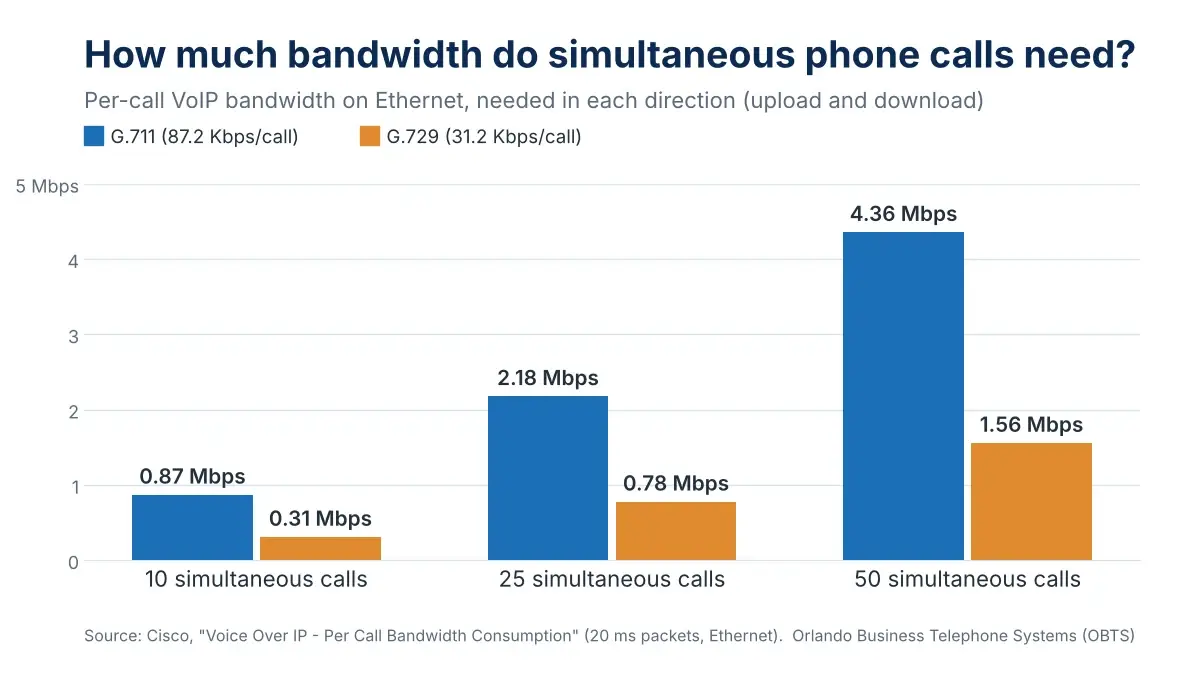
So 40 simultaneous G.711 calls need about 3.5 Mbps of upload, not just download. That’s small next to a modern business circuit, but upload is exactly where cable broadband is thinnest, and those calls compete with every video meeting and cloud backup on the same line. Our comparison of broadband vs. dedicated fiber covers the circuit side.
Three network items to check on any install past 25 phones
- A voice VLAN. Phones get their own network segment so their traffic can be identified and prioritized.
- QoS end to end. The switches, the firewall and the internet edge all have to honor the voice priority marking. If one hop ignores it, the marking does nothing.
- The PoE power budget. Count the watts, not just the ports. A 48-port PoE switch with a small power budget can’t run 48 phones plus the cameras and access points someone plugged in later.
None of this holds up on unlabeled, untested cable. At this size the phones ride the same structured cabling as everything else, so a marginal run shows up as one desk phone that keeps rebooting. On our Welbro offices project in Maitland, the voice system was integrated with the network infrastructure already in place, which is the cleaner build whenever that network tests clean.
911 that finds the right floor and suite
Two federal rules apply to any multi-line telephone system, and the FCC’s definition names VoIP, Centrex, PBX and hybrid systems explicitly, so a hosted system is covered the same as a PBX in the closet (47 CFR 9.3).
Kari’s Law requires that anyone can dial 911 directly, with no 9 or other prefix, and that the system notify a central point, such as a front desk or security office, when someone does. It applies to systems manufactured, imported, sold, leased or installed after February 16, 2020 (FCC, MLTS 911 Requirements).
RAY BAUM’S Act, Section 506, adds dispatchable location: the validated street address plus the suite or similar detail responders need to find the caller. The rule set January 6, 2021 as the deadline for fixed desk phones to send it automatically, and January 6, 2022 for on-premises non-fixed devices and off-premises devices, where technically feasible (47 CFR 9.16).
This is where mid-size offices get caught. One street address with three floors, or a business park with four buildings, is not a dispatchable location on its own. Every phone needs a location record tied to where it actually sits, and someone has to update it when desks move. The notification has content rules too: it must say a 911 call was made and, where technically feasible, include a callback number and the location sent to dispatch.
Before go-live, confirm four things:
- Every desk phone dials 911 with no prefix.
- Each phone’s location record names the building, floor and suite or room.
- The notification reaches a screen or a person that is staffed in business hours, and somewhere sensible after hours.
- Softphones and remote staff have a way to update their location when they work from somewhere else.
Running several locations as one phone system
The point of a single system across sites is that callers and staff can’t tell where anyone is sitting. In practice that means four-digit extension dialing between offices, one main number and auto attendant, hunt groups and queues that pull agents from any site, and one company directory.
Each site still has to plan for two things on its own. First, 911: every location gets a separate address, location records and notification point. Second, survivability: decide ahead of time what happens when a branch loses internet. On a cloud system that means calls forward to cell phones or ring at another office. With a PBX or hybrid design it can mean a local gateway that keeps the branch’s internal calls working and sends outside calls over a backup line.
OBTS serves offices across Orlando, Winter Park, Lake Mary, Sanford, Kissimmee and Altamonte Springs, and when one company spans several of them, the goal at every branch is the same: an outage there should be an inconvenience, not a dead phone line.
Cutting over 50+ phones without a dead day
Large cutovers fail in the gap between the old system going quiet and the new one taking calls. Close that gap three ways:
- Build and test the new system alongside the old one, on temporary numbers, before any number moves.
- Port numbers on a scheduled date with the old service still live until the port completes, so there’s never a moment without a carrier.
- Move by floor or by site, after hours, with someone walking the floor the next morning to find the phone that didn’t register.
A single office of 10 to 25 phones is usually a two-to-four-week project for us. At 50 to 100+ phones or several sites, the schedule depends on how many carriers your numbers are spread across and whether any site needs new cabling, which is why we start with a site survey rather than a quote.
A worked example: 60 phones across two offices
Here’s how the math runs on an illustrative layout (not a specific client): a 45-phone headquarters on three floors near downtown Orlando and a 15-phone branch in Lake Mary.
- Call paths. Call records show the busiest hour peaks at 14 simultaneous outside calls across both offices. We’d plan for 20: the peak plus room to grow.
- Bandwidth. Even if all 20 landed at headquarters, 20 G.711 calls at 87.2 kbps is about 1.7 Mbps each way. The voice load fits on either circuit; the upload left over for video and backups is the real question.
- 911. Headquarters needs at least three location records, one per floor, and more if floors are split into suites. Lake Mary is a separate address with separate records. Notifications go to the headquarters front desk in business hours and to a manager’s phone after hours.
- Design. With no existing PBX worth keeping, this office lands on cloud: one system, four-digit dialing between buildings, and Lake Mary’s calls forward to cell phones if its internet drops.
Key takeaways
- Past 25 phones, the system decision is an engineering decision: call control, capacity, network and 911.
- Size SIP trunks or bandwidth to peak simultaneous calls from your own call records, not to headcount.
- Plan for about 87 kbps each way per G.711 call and protect it with a voice VLAN and end-to-end QoS.
- Kari’s Law and RAY BAUM’S Act apply to hosted and on-premise systems alike; every phone needs a floor- or suite-level location.
- In a multi-site system, each location carries a separate 911 record and a plan for losing its internet line.
Planning a 25+ phone system or a second location?
Orlando Business Telephone Systems has designed, installed and supported business phone systems across Central Florida since 1982. We’ll survey the site, read your call records and size the system to how your office actually uses the phone.
Frequently asked questions
How many SIP trunks do I need for 50 employees?
As many as your peak number of simultaneous outside calls, plus room to grow. For most 50-person offices that’s well under 50 paths, because most people aren’t on an outside call at the same moment. Pull your busiest hour from your call records or ask your carrier, then add headroom. Call-heavy teams like sales or dispatch are the exception and can need a path per person.
Is cloud or on-premise better for an office with 100 phones?
Usually cloud, if you don’t already own a PBX worth keeping. On-premise still makes sense for heavy call centers, for businesses that need internal calling to survive an internet outage, and for anyone whose current PBX was a recent purchase.
Can one phone system cover offices in Orlando and Lake Mary?
Yes. One cloud or hybrid system can run both offices with four-digit dialing between them, one auto attendant and shared call queues. Each office still keeps a separate 911 address and location records, a notification point, and a plan for when its internet goes down.
Do our phones need their own internet line?
Not usually. They need enough upload capacity for your peak calls, about 87 kbps per G.711 call, and QoS so voice gets priority over everything else on the line. A second line earns its place as a backup that keeps the phones up when the main circuit fails, more than as a dedicated voice line.
What does Kari’s Law require from a multi-line phone system?
Direct 911 dialing with no prefix from every phone, and a notification to a central location, such as a front desk or security office, whenever someone dials 911. It applies to multi-line systems manufactured, imported, sold, leased or installed after February 16, 2020, and hosted VoIP systems are included.
Is it legal to record business calls in Florida?
Plan on getting everyone’s consent. Florida’s interception law makes recording lawful when all parties have given prior consent (Florida Statutes 934.03), which is why recorded business lines play an announcement at the start of the call. If you’re adding recording to a queue or contact center, set up the announcement before you turn recording on.